Tuesday, July 2, 2019

Dyslexia Gold (A Homeschool Crew Review)


Having a child that is a struggling reader, I'm always on the lookout for a program that could help Garrett to improve his reading.  For the last few months, members of the Crew have been reviewing a lifetime subscription of Dyslexia Gold Full Bundle from Dyslexia Gold.   We were given a family license for the program that provided access to both Ashleigh and Garrett. 


Dyslexia Gold Full Bundle includes four individual sections: Engaging Eyes, Fluency Builder, Spelling Tutor and Times Table Tutor. 

Engaging Eyes - games that focus both eyes to one point on page.  These games include Target Practice and Whack an Alien.  These activities take roughly ten minutes to complete each day and some require the use of special 3D glasses.

Fluency Builder - works on reading speed, accuracy and comprehension by helping develop phonological awareness, phoneme manipulation, segmentation, auditory discrimination and morpheme  mapping.  This portion of the program takes roughly 10-15 minutes each day. 

Spelling Tutor - Teaches students to spell more roughly 1000 of the most commonly used words by dictation.  This portion of the program takes roughly 15 minutes to complete. 

Time Table Tutor - uses the Singapore math system that teaches math using three steps: concrete, pictorial and abstract.  Students work learning their time tables up until 12x12. This portion of the program takes roughly 10-15 minutes each day. 


Targeting students ages 7 to 11 as well as those who are struggling and behind, Dyslexia Gold boasts that students can improve their reading levels on average by 12 months and their spelling levels by 10.5 months by using this program on average for 10 minutes for a full 30 days (roughly 10 hours of program use).


When we first started using Dyslexia Gold, the kids really liked it.  However, with four sections that are expected to be used daily, this quickly became VERY time consuming.   However, we did try to trudge along and get it done to give this program a fair shot. 


To be honest, we did really like it to begin with and I could see how this program could help Garrett improve his reading.  We found it to be under level for where Ashleigh is currently at, especially in the language arts department.  


For the first few weeks, the kids did seem to enjoy this program.. However, we began to run into a few problems with the Engaging Eyes.  After a certain level, Garrett would begin to get really frustrated because at a certain level, the images would not superimpose on each other and so he could not aim and hit the target. This was not a good thing for him, being that he is special needs, and led to a ton of tears.  I even put the glasses on to see what was going on and experienced the same thing. 


The first time it happened, we just thought it was a glitch, however, it continuously happened when he got to that level.  This eventually led to his absolutely refusal to use the program at all. 


Ashleigh never seemed to get to that same level and never ran into this issue.  However, I don't know if this was because she just didn't do as well at this activity and didn't progress as quickly with it as he did.


We also had a big problem with errors with the program.. For a few weeks, the kids would work on the program, and it would create an error.  The progress wouldn't save and for a while it looked like the kids did not log in.


When we could get the program to work, the portion that Garrett did seem to enjoy was the Fluency Builder section.. For this portion, he would be given some reading activities that taught phonics and eventually would give him a section to read.  This section would have him working on accuracy and fluency..


For more information about Dyslexia Gold and see if maybe it will work for your family, be sure to visit their website. You can also find more information on social media on facebook at :  https://www.facebook.com/DyslexiaGold/


Click on the banner below to read the other reviews of Crew members to read their reviews: 
Dyslexia Gold Full Bundle {Dyslexia Gold Reviews}

Thursday, June 27, 2019

Matific Galaxy (A Homeschool Crew Review)


If you should know anything about Ashleigh, it's that she absolutely hates math. She hates adding, she hates subtraction, she loathes multiplication and division, and don't even get me started about the strong feeling she has in regards to fractions and decimals.   Because of her hatred for the subject, she has really struggled with everything in regards to math because she just doesn't want to do it 


Enter  Matific Galaxy.  Members of the crew were given a one year subscription to Matific Galaxy  for one child. For this review, I decided to use the program exclusively with Ashleigh. 


Targeting students grades K-6th, Matific Galaxy is an online, browser based learning environment that makes learning and practicing math skills fun.  In addition to using a computer to access the program, students can also practice while on the go by downloading the companion app on their Iphone or Andriod smart phones (but not available from the Amazon store for Kindle). 

When starting with Matific Galaxy, we were asked to select a grade level to place Ashleigh in. Based on the math skills I knew that Ashleigh was struggling with, I opted to place her in a lower grade so we selected 4th Grade math.  This way I knew she was practicing skills that we could eventually build upon to get her doing math at grade level. 

The Grade 4 Level will have Ashleigh practicing 63 various skills, such as measurements, basic geometry, multiplication and division as well as those dreaded fractions and decimals.   The grade level can be changed in the parent portal, so if a grade is selected that is too easy or too hard, the parent can go in and adjust as needed.  For now, we are sticking with Grade 4. 


One our grade level was selected and locked in, Ashleigh was ready to go. 


The basis of the game is pretty simply.   The student must answer math questions correctly in order to help the inhabitants of Matific Galaxy.  An evil alien has taken the pixels of these inhabitants and students save them by getting the pixels back.    The inhabitants look, well, blocky, without their pixels but once the student has taken back the proper amount of pixels, the inhabitant transforms into a higher definition creature, which the student can interact with.

Each inhabitant has a series of different math skills that students work on in order to get all the pixels needed for that creature.  For Ashleigh, these skills have ranged from identifying geometric shapes (ie: trapezoid, rhombus, obtuse triangle) and parts (ie: verticies, edges, faces), to solving multiplication problems,  and working with simple fractions, just to name a few.   Each time the student works through a particular activity, they are awarded stars based on how well they did, as well as coins (which go towards leveling up) and they fill in some of the mixing pixels for the creature.


Each activity focuses on one skill.   For example, the portion below shows some fraction work.  For this section, the student is asked to identify the fraction of fish to answer the question asked.  Each activity has about 4-10 questions (depending on the skill being practiced).  Completion of the activity awards the student with stars, pixels and XP coins.


However, simply getting all the pixels back doesn't end that portion of the program.  Students are encouraged to continue to practice the skills that fall under each of these characters in order to earn prizes that they can use to dress the character up with.  The character also will get dirty and hungry, showing a sad face, creating more of a reason for the student to go back to that particular character and practice those skills.


The first time the student finishes a "world" and retrieves all the pixels for that creature, they are awarded a prize.  These prizes are used with the creature as accessories to either change his environment or for the creature to wear.  After the initial prize, students can earn more prizes for their creature by simply practicing the skills they have already completed in that section. So this prize system acts as an initiative to get students to continue practicing those skills rather than simply moving on to the next section and flying thru the program.


As a parent, I am able to log into the Parent Dashboard and see what progress Ashleigh is making. This is helpful as Ash tends to hop on while I'm working with her brother on another assignment and I don't always see exactly what she's working on.

From the parent's dashboard, I can see her overall results and what she's been working on.  I can also see what she needs additional work on.  Or, as in Ashleigh's case, I can see that she actually DOES know the skills she claims to not know when I hand her a math worksheet ;)   From this screen, I can also see what percentage of the program she's completed.     You can also use this screen to send lil messages of encouragement so that the next time your student logs in, it pops up and lets them know you acknowledge the hard work they are doing.


Going into the Reports section from the Parent's Dashboard provides a bit more information specific to what the child has been working on.  Here, you can see exact what skills the student has worked on, how well they did on that skill, and also see how it compares to other students working on that same portion of the program on Matific Galaxy.

The report also shows what each of the activities for each creature covered and how well the student did in that particular area, as well as how they performed versus the other students in the same portion.


Overall, Ashleigh has loved this program.  It plays into many aspects she likes, such as cutesy characters, fun games, and short activities. She actually asks to play this outside of school time.  it's really helping her to improve her confidence as far as math skills which is a definite plus for us.   Her overall scores on the activities has shown me that she isn't nearly as far behind as I thought she was, only that her lack of enjoyment has held her back.  We plan on working through the entire 4th grade portion of the program and then moving her to the next grade if possible during the subscription time frame. But this is a program that I can see us keeping for some period of time to allow her to work thru the various skills it teaches.


You can find more information about Matific Galaxy by visiting their website.  You can also find them on the following social media platforms:


#hsreviews #math #mathematics #learningthroughplay #edtech #edutech #educationtechnology #STEM #STEMeducation #mathanxiety #mathematical #mathproblems #mathonline #mathresource #mathteachingresource #elementaryeducation #kindergartenmath #elementarymath #mathgames #mathfun #funwithmath #mathforkids

Click the banner below to read reviews from the other Crew members and see how they used Matific Galaxy in their own homeschool environment :
Grow Your Math Skills with Matific Galaxy {Matific Galaxy Reviews}

Thursday, June 20, 2019

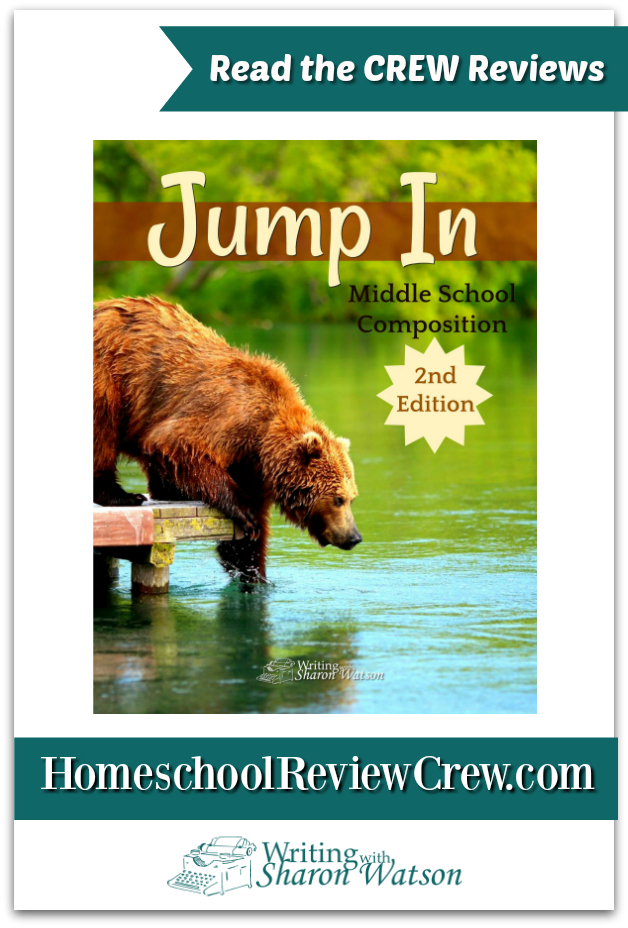
Jump In (A Homeschool Crew Review)


When you homeschool multiple kids, there's going to be multiple subjects that are very difficult for each student.  For Ashleigh, it's math.  For Garrett, it's writing.   Garrett hates writing with a passion.  However, for the last few weeks, we have been using Jump In, 2nd Edition, a student directed middle school writing curriculum from Writing with Sharon Watson and may have found the tool that we need to change that for him.


Student Book
Teacher's Guide
For this review, we received the 2nd Edition of the Jump In Middle School Composition curriculum in the digital format, as well as the accompanying Teacher's Guide, also in digital format.  Both of these books are also available for purchase in physical format from the author's website.  The Student book is 292 pages in length while the Teacher's Guide is 123 pages in length.

Jump In is designed to teach writing to students on the middle school level (mature 5th, 6th, 7th and 8th grade).  Throughout the curriculum, students work through 98 daily lessons (which are referred to as skills) as well as 19 addition activities and checklists.  These lessons are designed to take roughly 5 to 20 minutes to complete each day, depending on what is being worked on. Students begin by learning how to write simple paragraphs using topic sentences and focusing on main ideas in order to keep their writing on point, but as they progress through the curriculum they will learn to write nine various types of essays as well as a research paper.   Options are given for reluctant writers as well as eager, more experienced writers.

Jump In gives three different scheduling options to help incorporate the curriculum into your school year.  Schedules are given for a One Year Plan, Two Year Plan, and Three Year Plan.  Depending on the age of your student or how much time you have to work through the curriculum, there's an option that should work for you.


The main portion of the curriculum is the Student Edition.   Through each section, students are walked step by step through how to write various types of papers.

Papers that will be written include:
Get Your Feet Wet
Opinions—You’ve Got Them
Persuasion: The Basics
Cause and Effect
A Newspaper Article
A How-to
A Report
A Biography
Compare and Contrast
A Book Report
A Book Response
Description
Narration
Poetry

The process includes methods of brainstorming and then writing the initial paper, then moving on to proofreading, editing and revising that paper to create a more polished finished paper.

While Jump In is designed to be more student lead, there is a Teacher's Guide available. The Teacher's Guide is designed to help the parent/teacher guide the reluctant writer through each step of the process, as well as serves as a guide the parent as to how to grade papers, and also guides the parent how to monitor their student's progress.

Upon receiving the digital file for Jump In and giving it a good look over, I printed both files out.  The 123 page file for the Teacher's Guide was easy to print, punch holes and contain in a small 1/2 inch three ring binder.


Ashleigh and Garrett's student workbook file was 293 pages in length, slightly longer but still able to fit neatly in their 2 inch binder.


We didn't exactly Jump In with Jump In but instead decided to wade in a bit more slowly (especially with Garrett) by using the three year schedule program offered in the book.  We are currently working through a hybrid 5th-6th grade year, so this will allow us the full three years to really focus on the book and work slowly through it in it's entirety.   Garrett NEEDS the instruction in this book, so I'm very happy that we're receiving this now rather than later.

Using this Three Year Schedule, we have focused strictly on using the writing prompts for now in order to allow Garrett the opportunity to get use to writing.   An entire section of writing prompts,  called Ten Minute Plunges, are provided.  These prompts are broken down first by month and then by week, giving four prompts per week to choose from for each month of the normal school year (September thru May).


 As we are currently in the summer months and are doing less than we do during the regular year, so we are picking two prompts a week to focus on - one on Monday and one on Friday.   I simply write the prompt on the white board for the kids to see, we will have a quick discussion about the prompt and then the kids are given 10 minutes to write.

Writing Prompt Time
This process started rather clumsy to begin with.  Ashleigh, being ahead of her brother in the language arts/writing department, was quickly able to easily put her thoughts on a page or two of paper in that ten minutes. Garrett, on the other hand, struggled at the beginning.  For example, one of the prompts asked "If you could have an artist paint a picture for you, what would you have the
artist paint?"..  I ended up having to ask a ton of guided questions to Garrett, trying to get him to think what he wanted to write.  After asking a question and having him give an answer, I would tell him to write about that answer.  He would write one sentence, then look at me and ask "Now what?".  This continued for a number of the prompts, however, he is starting to figure out he can build upon his answers and write a bit more without my prompting.

Garrett's First Attempt at a Writing Prompt

We will take the entire summer, continuing with the various writing prompts (and adding a few of our own) before we will move on to our first paper.  With the three year schedule, students are asked to work on the writing prompts for a few weeks before working on one of the writing chapters, then switching back to the writing prompts again.  Our plan is to work thru the book in order, starting with writing an opinion paper (which I think might be easiest for Garrett), which would for him to write a paper roughly 150 words in length.  As he progresses through the curriculum, the hope is he would get comfortable writing a paper  closer to 300-400 words in length, depending on the type of paper being asked to write.

While we are still wading into the shallow end of this writing pool, I have taken a look at the various lessons included in this curriculum and I have a strong feeling that this will work very well for Garrett.  Just in the weeks of doing writing prompts, I've noticed that Garrett is getting more comfortable with actually writing, even with other subjects.  I've noticed that just the process of jotting words down on paper has seemed to become easier for him, with less frustration.

I am really looking forward to using this as our main writing curriculum for our upcoming school year.  I think the short, less demanding lessons will be perfect for him to build confidence as a writer.


For more information about Jump In 2nd Edition as well as other products from Sharon Watson, be sure to visit the website.  You can also find more information on the following social media platforms:

Facebook: https://www.facebook.com/writingwithsharonwatson
Pinterest: www.pinterest.com/writingwithshar


Be sure to click the banner below to see how other members of the crew used Jump In with their homeschool students. 
Jump In, 2nd Edition {Writing with Sharon Watson Reviews}

Monday, June 17, 2019

Homeschool Convention Part 2


Probably the most exciting portion of a homeschool convention for most people is the vendors hall.  Who can resist all the shiny new curriculum.   While most of my family would be perfectly happy only visiting the Rainbow Resources booth (which I think we went back to at least three separate times), the homeschool parent in me loves just browsing and looking at all the wonderful offerings, many of which I had never heard of.


Speaking of the vendor hall - we were able to meet a few vendors that we have reviewed in the past..  Ashleigh was absolutely thrilled to meet Brenda Ellis from Artistic Pursuits (Artisticpursuits.com)  who was so sweet..  We love her art books and Ashleigh enjoyed showing her some of the artwork we have done using her art instructions.


This particular vendor was a huge surprise for us.  In 2016, we did a review for the Spanish program for Foreign Language for Kids by Kids.   That was a video program where students watched the interaction between three brothers and their mother going about their morning routine, all in Spanish.  Well, two of the boys were at the convention and Ashleigh and Garrett had the opportunity to talk with them (well, Ashleigh talked, Garrett, not so much lol).


Okay, so lets start with the things I actually purchased.    


First, let me state, there's a few things purchased that are not included in this photo.  First, I purchased the Elementary Greek Year 1 Set from Memoria Press.  This is being shipped to my home and will be here next week.    This will be Garrett's foreign language study starting in Sept.  (Ashleigh is using Latina Christiana also from Memoria Press)

The second thing we purchased that is also being shipped is the Butterfly Farm kit from Insect Lore.


I have mentioned a number of times how much I love the biographies from YWAM publishing and I had already planned on taking advantage of their convention pricing  (10 books for $55).  The hard part was narrowing it down to only 10!!!   The War of the Worlds book came from another vendor (possibly Rainbow Resources?) and was purchased by my husband and it's one of his favorite books.  I did regret not picking up the Book of World Maps that they had, as well as the Ben Carson biography. LOL 


Next, I purchased the Student Notebook to go with the third edition of Apologia's General Science.  The kids will be reviewing this curriculum over the next few weeks, although I had already planned on using this curriculum with them this year for their main science curriculum.  I needed a second copy of the notebook so that both kids had their own.   I was VERY lucky that Rainbow Resources had 1 copy of this notebook available, and at a very cheap price too. 


Here's the "fun" stuff that the kids each selected.  The tins of thinking putty are an absolute must for us at convention as it helps keep the kids entertained during workshops (especially Garrett who tends to get antsy and will start crying after a while).  Ashleigh picked out the butterfly magnet kit and the glowing planets while Garrett picked out the IQ Fit kit and the Dig for Gold kit (that had a piece of Iron Pyrite in it).


Alyssa picked out this really cool Tolkien's World coloring book as well as her own larger tin of Thinking Putty. 


One of the extra purchases that I made was from the Celtic Life and Heritage Foundation.   They offer free educational modules in regards to preserve Celtic Irish heritage.  They do rely on donations and help to finance the site through the sales of a card game titled Seanchai, which means Storyteller.  Being that my mother is a McGrath , I knew my grandfather would haunt me if I did help support this cause ;)   So I bought a set of the game cards as well as an additional monetary contribution to help support the site.   I'm looking forward to using these to help education myself and the kids on our Irish heritage.

In addition to the purchases we made, we bought home a whole ton of freebies.. From glowing mouse ears from Time4Teaching.com, a few silky superhero robes and a bag from Memoria Press, Magazine from Homeschooling today, key chains from Medieval Times and tshirts from Ifly and Focus on the Family, we had tons of things to bring home.

 Not to mention all the book marks, catalogs and sales materials I will have fun looking over the enxt few weeks :)


I would say Convention 2019 was a huge success, both in terms of great workshops and some good hauls from the vendor hall.     Now to start saving for 2020 :)

Disclosure

Disclosure
Related Posts Plugin for WordPress, Blogger...